> Check the new Catalog onboarding guide. We created this guide to improve the onboarding experience for developers at VTEX. It assembles all documentation on our Developer Portal about Catalog and is organized by focusing on the developer's journey. Methods for collecting product/SKU catalog data, categories, brands and other information. All content that comes between `{{}}` keys must be replaced with the correct data before performing the request. ## Index - Product - Here you can consult, create, or update a Product. For more information, check this article. - Product Specification - You can consult, create, or update additional information of a Product. For more information, check this article. - SKU - Here you can consult, create, or update an SKU. For more information, check this article. - SKU Complement - You can consult, create, or update an SKU Complement. An SKU Complement is a new SKU that has a Parent SKU. - SKU EAN - Here you can consult, create, or update an SKU unique identification code (barcode). - SKU Attachment - You can consult, create, or update an SKU Attachment. An attachment is used to add custom information about the item. For more information, check this
With the Catalog API for Seller Portal, you will be able to create, edit and consult products and their variations, brands, and categories. > This API is part of the Seller Portal Catalog. This functionality is in the Beta stage and can be discontinued at any moment at VTEX's discretion. VTEX will not be responsible for any instabilities caused by its use or discontinuity. If you have any questions, please contact our Support Center. ## Index ### Product `GET` Get Product by ID `PUT` Update Product `GET` Get Product Description by Product ID `PUT` Update Product Description by Product ID `GET` Get Product by external ID, SKU ID, SKU external ID or slug `POST` Create Product ### SKU `GET` Search for SKU `GET` Get List of SKUs ### Brand `GET` Get List of Brands `POST` Create a Brand `GET` Get Brand by ID `PUT` Update Brand ### Category `GET` Get Category Tree `PUT` Update Category Tree `GET` Get Category by ID `POST` Create a Category
>ℹ️ Check the new Checkout onboarding guide. We created this guide to improve the onboarding experience for developers at VTEX. It assembles all documentation on our Developer Portal about the Checkout and is organized by focusing on the developer's journey. The Checkout API allows you to obtain and configure information about the shopping cart and its attachments, personalization of custom fields, orderForm structure, fulfillment data, order management, and identification of the sellers delivery region. >ℹ️ Data modification operations (`POST`, `PATCH`, `PUT` or `DELETE` endpoints) shall not be performed in parallel in the Checkout APIs. They need to be enqueued by the client/requester. Otherwise, old values can be overwritten incorrectly or competition errors may occur. >⚠️ All endpoints that consult or edit the orderForm can change the authentication depending on the customer context. If you are handling information from a customer with a complete profile on the store, authentication will be required. You can only access or modify the customer data for these profiles with an authenticated request. ## Shopping cart Allows merchants to simulate, configure and customize shopping
With Customer Credit your store can enable **credit payments** through the checkout. You can also control **invoices** and the **credit limits** of your clients. Learn more about Customer Credit in our Help Center article. All requests need the **authorization header**. Additionally, you can find more information on installment payments for an order in the `customData` field found in the Get Order endpoint of the Orders API. This includes the number of installments, amount and due dates. This API allows two kinds of authorization: 1. Authorization header containing the VTEX ID authentication token. 2. VTEX Appkey and Apptoken headers.
>ℹ️ Onboarding guide > > Check the new Payments onboarding guide. We created this guide to improve the onboarding experience for developers at VTEX. It assembles all documentation on our Developer Portal about Payments and is organized by focusing on the developer's journey. The Gift Card is a payment method configured as a cash value associated with a client. It is used to grant a discount on the value of the order at the store. > ⚠ A Gift Card works as a **payment method**, not a promotion.
>ℹ️ Check the new Payments onboarding guide. We created this guide to improve the onboarding experience for developers at VTEX. It assembles all documentation on our Developer Portal about Payments and is organized by focusing on the developer's journey. The Gift Card Hub API allows interactions with all Gift Card providers registered to a store from a single point. Gift Card providers are systems capable of providing cards to be used in the buying process. The following is the sequence diagram that represents calls in the purchase closing process. 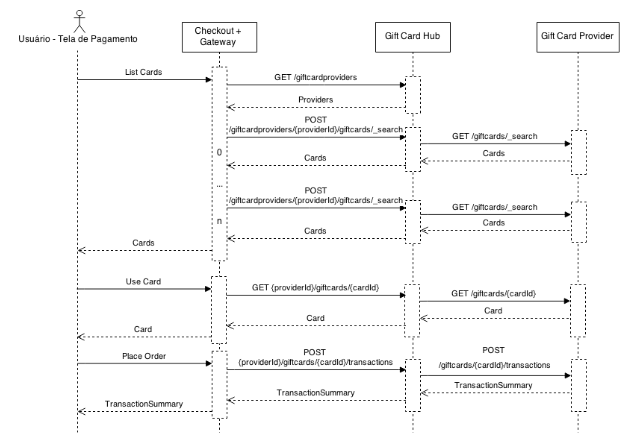 **Checkout + Gateway**: Systems responsible for the sale and for processing orders and payments. **Gift Card Hub**: System responsible for managing multiple registered Gift Card providers for a store. **Gift Card Provider**: System responsible for providing the Gift Cards available to the user not closing a purchase. This system can be implemented by third parties.
>ℹ️ Onboarding guide > > Check the new Search onboarding guide. We created this guide to improve the onboarding experience for developers at VTEX. It assembles all documentation on our Developer Portal about Search and is organized by focusing on the developer's journey. This API is from the VTEX Intelligent Search solution, an alternative to the platform’s native search, as it assists the customer in their purchase journey, and it presents results since the first interaction with the search bar. ## Index - Get list of the 10 most searched terms - Get list of suggested terms and attributes similar to the search term - Get attempt of correction of a misspelled term - Get list of banners registered for query - Get list of suggested terms similar to the search term - Get list of products for a query - Get list of the possible facets for a given query
> Check the new Search onboarding guide. We created this guide to improve the onboarding experience for developers at VTEX. It assembles all documentation on our Developer Portal about Search and is organized by focusing on the developer's journey. This API lets you search and sort products in the Catalog using Fulltext, Category and Brand search terms. Retrieve product data to create custom searches and product shelves.
## Welcome! The License Manager API allows you to create users, modify their names and emails, as well as add and remove roles from users. ### ATTRIBUTES |Attribute name | Description | |:------------|--------------| |accountName | Account name in VTEX License Manager | |environment | Environment on which you want to run the query e.g. vtexcommercestable | |userId | Unique user identification string | |roleId | Integer that represents a role, can be looked up on the License Manager UI |
>Check the Fulfillment onboarding guide. We created this guide to improve the onboarding experience for developers at VTEX. It assembles all documentation on our Developer Portal about fulfillment and is organized by focusing on the developer's journey. Logistics or fulfillment is the module responsible for shipping calculation and inventory management. The variable `{{environment}}` can be filled with `vtexcommercestable` or `vtexcommercebeta`, depending on the environment you want to test.
The **Marketplace API** enables marketplaces and sellers hosted on VTEX to perform their collaborative operations. >⚠️ The marketplace must create an appKey and appToken for each non-VTEX seller that will use this API. ## Index ### Notification Endpoints used by sellers to notify marketplaces that the price or inventory language has changed for one of their SKUs. `POST` Notify marketplace of price update `POST` Notify marketplace of inventory update ### Suggestions #### Get Suggestions Search and filter all suggestions using specific criteria. `GET` Get all SKU Suggestions `GET` Get SKU Suggestion by ID #### Manage Suggestions Send or delete SKU suggestions from the seller to marketplace. `PUT` Send SKU Suggestion `DELETE` Delete SKU Suggestion #### Get Versions Search and filter all versions of suggestions, using specific criteria. `GET` Get all versions `GET` Get version by ID #### Match Received SKUs Match SKU suggestions received in the marketplace. `PUT` Match Received SKUs individually `PUT` Match Multiple Received SKUs #### SKU Approval Settings Allows marketplaces to configure rules for automatically and manually approving SKUs received from sellers. `GET`Get autoApprove St
The _Marketplace Protocol_ is a set of API requests and definitions to help you integrate external sellers into a VTEX marketplace as well as external marketplaces into VTEX sellers. ## External Seller Here you will find the endpoints involved in the integration between a VTEX marketplace and an external seller. Note that some of these requests are typically sent by the seller while others are received. | **Request** | **From** | **To** | |-|-|-| | Fulfillment simulation | Marketplace | Seller | | Order placement | Marketplace | Seller | | Authorize fulfillment | Marketplace | Seller | | Marketplace order cancellation | Marketplace | Seller | | Send invoice | Seller | Marketplace | | Send tracking information | Seller | Marketplace | | Update tracking status | Seller | Marketplace | | Cancel order in marketplace | Seller | Marketplace | For a detailed explanation of the steps required to develop a custom connector to sell products from an external seller in your storefront, check out our complete External Seller Integration Guide. ## External Marketplace In this section, you will find the endpoints involved in the VTEX integration between an external marketplace and a VTEX seller.
# ATTENTION: **This version isn't compliant with data entities of old version (e.g. CL and AD). It's possible to use this configuration only to new data entities.** ## Welcome! VTEX Master Data is an easy-to-use, secure, fast, scalable and extensible repository. On it you can create your own Entities, store data and consult directly from the storefront or use it to store info for some external integration. There are internal VTEX modules that use VTEX Master Data as data repository. We have the VTEX Customer Service, VTEX Profile System and VTEX InStore, for example. It is also used by other internal services. There are two ways to use Master Data: 1. Directly from the storefront 2. External integration ### Directly from the storefront If your scenario is to be used inside the storefront, be aware of the following observations: 1. Use the storefront host to query or store information to avoid **CORS**; 2. Configure which information should be public and which shouldn't, inside the JSON Schema of the Data Entity; 3. Do not create query loops (the storefront may be affected with Throttling and apis may be turned off as a security protection); 4. Never add via JS any type of authentic
>Check the new Orders onboarding guide. We created this guide to improve the onboarding experience for developers at VTEX. It assembles all documentation on our Developer Portal about Orders and is organized by focusing on the developer's journey. Receive, process, and manage every order in your store through our Order Management API.
>ℹ️ Onboarding guide > > Check the new Payments onboarding guide. We created this guide to improve the onboarding experience for developers at VTEX. It assembles all documentation on our Developer Portal about Payments and is organized by focusing on the developer's journey. The Payments Gateway API allows you to get payment data and process your store's transactions.
This API will create promotion alarms when selling products with undesired prices and promotions. It will create conditions that will check if the prices and the promotions are correct. If not, the system will alarm the store with information about the product sold at unexpected prices. ## Index `GET` Get Policy List `POST` Evaluate Policies `GET` Get Policy by ID `POST` Create Policy `PUT` Update Policy `DELETE` Delete Policy by ID
> Check the new Pricing onboarding guide. We created this guide to improve the onboarding experience for developers at VTEX. It assembles all documentation on our Developer Portal about Pricing and is organized by focusing on the developer's journey The Price Simulations API allows you to configure custom price selectors for B2B stores, based on the context set by the Orders Configuration app. ## Custom Prices In this section, you can create a specific shopping scenario with the criteria you want. For explaining purpose, we used the `orderType` and `state` as default values, but it can be others too. `GET` Get custom prices schema `POST` Create or Update custom prices schema ## Session Management Every time you edit a configuration value set on the Custom Prices session, you must use this endpoint to update the Order Configuration. `POST` Update Order Configuration ## Price Association Use these routes to associate a shopping scenario, created at the Custom Price session, to a specific price table. `GET` Get price association by ID `POST` Create price association `PUT` Update price association by ID `DELETE` Disassociate price association by ID
> Check the new Pricing onboarding guide. We created this guide to improve the onboarding experience for developers at VTEX. It assembles all documentation on our Developer Portal about Pricing and is organized by focusing on the developer's journey. Pricing is the VTEX module responsible for the SKU's price list. At this module we have the base price of each SKU, some optional fixed prices by trade policy, and some rules that can be applied to generate dynamically different final prices according to the purchase context and the trade policy. The variables used in this collection are: * **{{accountName}}** = You VTEX account name. * **{{tradePolicyId}}** = Current Trade Policy ID. * **{{itemId}}** = SKU ID. * **{{X-VTEX-API-AppKey}}** and **{{X-VTEX-API-AppToken}}** = Credentials. You can get more information about how to use this module and its business logic at VTEX Help. ## Rate Limits ### Limits per route - `GET`: routes are not rate limited at the moment - `PUT or POST`: `40 requests/second/account` in any **price insert/update route** with 1000 *Burst Credits* - `DELETE`: `16 requests/second/account` in any **price deletion route**, with 300 *Burst Credits*. ### What are Burs
> This feature is in closed beta, available only for selected customers. If you have any questions, contact our Support. In the B2B scenario, it is common for stores to have personalized prices per customer and complex pricing systems that require external integrations. Pricing Hub is a system developed for the B2B context that works as an intermediary between VTEX and external pricing systems. In VTEX, B2B stores have the option to use our internal pricing system or an external one. If the store chooses to operate with an external pricing system, Pricing Hub will query an external price calculation API. The external API should then respond with the price for all items in the shopping cart according to its predefined tax rules. !Pricing hub protocal diagram ## Implementation To connect with external pricing systems using Pricing Hub, it is necessary to build a VTEX IO middleware app. We offer two reference implementation templates to simplify this process: - C# template - Node template Read the documentation on each repository to learn more about the required steps to use and customize the app. > The app used by Pricing Hub to connect must be a `major 0`. ## Specifications See belo